 30 DAYS MONEY BACK GUARANTEE
100% refund if you are not satisfied
30 DAYS MONEY BACK GUARANTEE
100% refund if you are not satisfied





At first glance, online stores seem to be simple and easy to manage. You create a product, display it on product pages, and the customer clicks on the Add to Cart button.
But for many store owners, especially those handling B2B business or custom-made products, this type of transaction isn’t always possible. So, what can we do in these cases?
Usually, the solution was to build a product showcase and manage sales through emails or phone calls, sending personalized quotes back and forth. But in 2026, is this still the best way to go? Or is there a better option for store owners and customers alike?
The answer lies in using either a catalog mode plugin or a request a quote plugin. With these, you can replace the “Add to Cart” button with a “Quote” button, create a quote form, and allow guest users to build a quote cart. This system bypasses the delays of traditional communication, helps you manage products and customers more effectively, and streamlines the purchasing process.
If you’ve built your store with WooCommerce, this guide is for you. We’ll explore when to enable catalog mode to hide prices, as well as when to use the “Request a Quote” option. We’ll show you how this plugin integration can help you design a smoother experience for your customers and grow your business.
Table of contents
- When should you rely on catalog mode or a request a quote system?
- When to use Catalog Mode and when to Request a Quote? The selection criteria
- The Hybrid Strategy: How to integrate Catalog Mode and Request a Quote for maximum results
- FAQs about Catalog Mode and Request a Quote
- Conclusion: What is the right solution for your business?
When should you rely on catalog mode or a request a quote system?
First, let’s define each term. What is catalog mode? It is a showcase of products that cannot be purchased the traditional way, by adding them to a cart and proceeding to checkout.
There are different features that catalogs can have, but generally, there are two scenarios: one that displays the product price but hides the “Add to Cart” button and another that hides prices entirely, showing only items on product or category pages without purchase options.
Stores sometimes only use this feature, especially for products and services that require in-person meetings. In this case, the catalog becomes a virtual display, similar to how car dealerships present vehicles.
However, in most cases, the catalog includes an “Add to Quote” button. This allows customers to create a list of all the products they want to purchase. The list is then sent to the seller, who can provide prices or redirect the customer to the Cart page.
In what cases are these features used?
- B2B (Business-to-Business) sales: products and services reserved for other companies, where the price estimate varies depending on product quantity, shipping method, and other crucial factors. There are also online shops that offer products to both end customers (i.e., with a B2C business model) and wholesalers (B2B).
- Products with variable prices and/or custom-made products: there are many types of products and/or services for which the product price is not fixed. This includes everything related to craftsmanship, especially high-value products such as jewelry, woodwork, and metalwork. It also includes clothing, custom-made furniture, industrial machinery, and much more.
- Sites undergoing maintenance: a catalog can be a great solution to allow your customers to view your products and services even when they are not available. Displaying a catalog can encourage customers to learn more about your products and plan future purchases.
- Products subject to restrictions: such as medicines and alcohol, where the customer must provide their identity and/or relevant documents before proceeding with the purchase.
There are numerous other cases in which these two features can be used, but it would be redundant to list them all.
So now, let’s see how to create a catalog quickly and easily on your WooCommerce-powered eCommerce site without any technical programming skills.
To do this, we will use two plugins.
The YITH Advantage: Beyond a simple showcase
To create a catalog, we recommend the YITH WooCommerce Catalog Mode plugin. This plugin, available in both a free version (with limited functionality) and a premium version, allows you to transform your site into a virtual showcase with great customization possibilities!
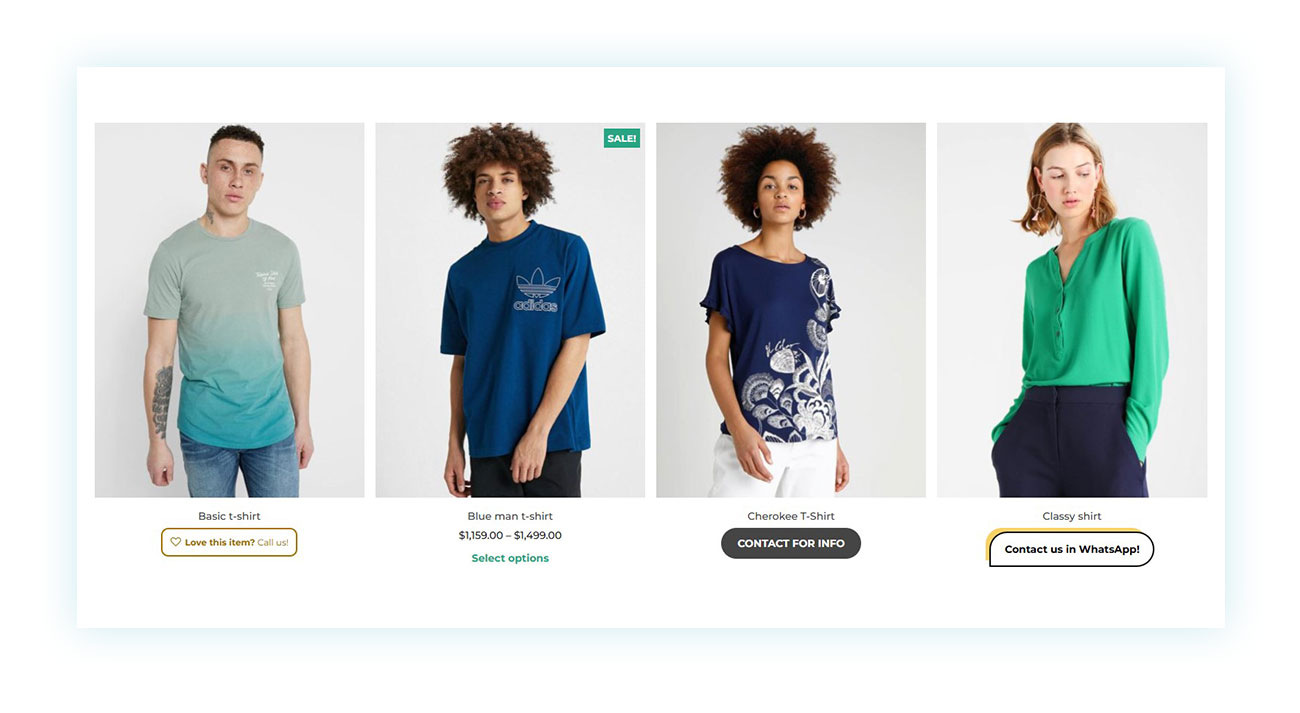
You can choose which products to display prices for and which buttons to include. You have complete freedom to customize them.
For example, consider the third product in the image above. Once opened, it appears like this:
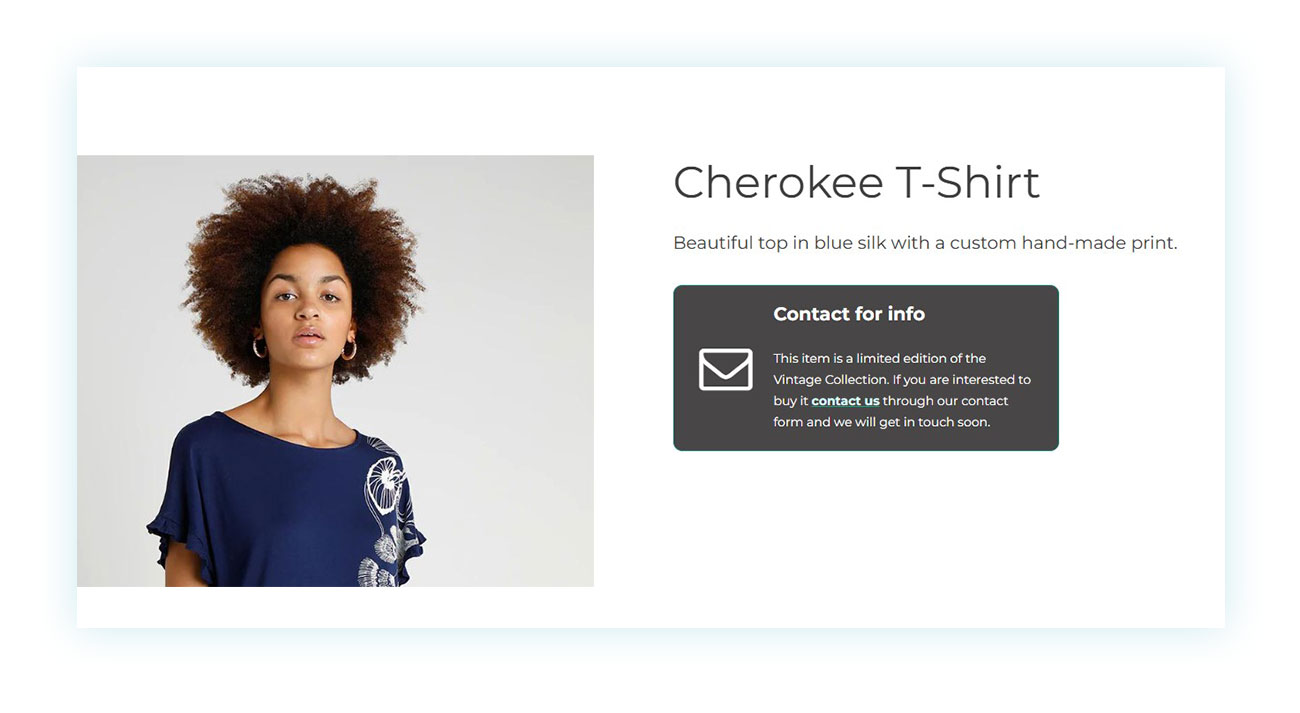
As you can see, we have inserted a message that redirects to the default form created by the same plugin to obtain more information about the product.
You can use the plugin’s control panel to choose what to display and for which products:
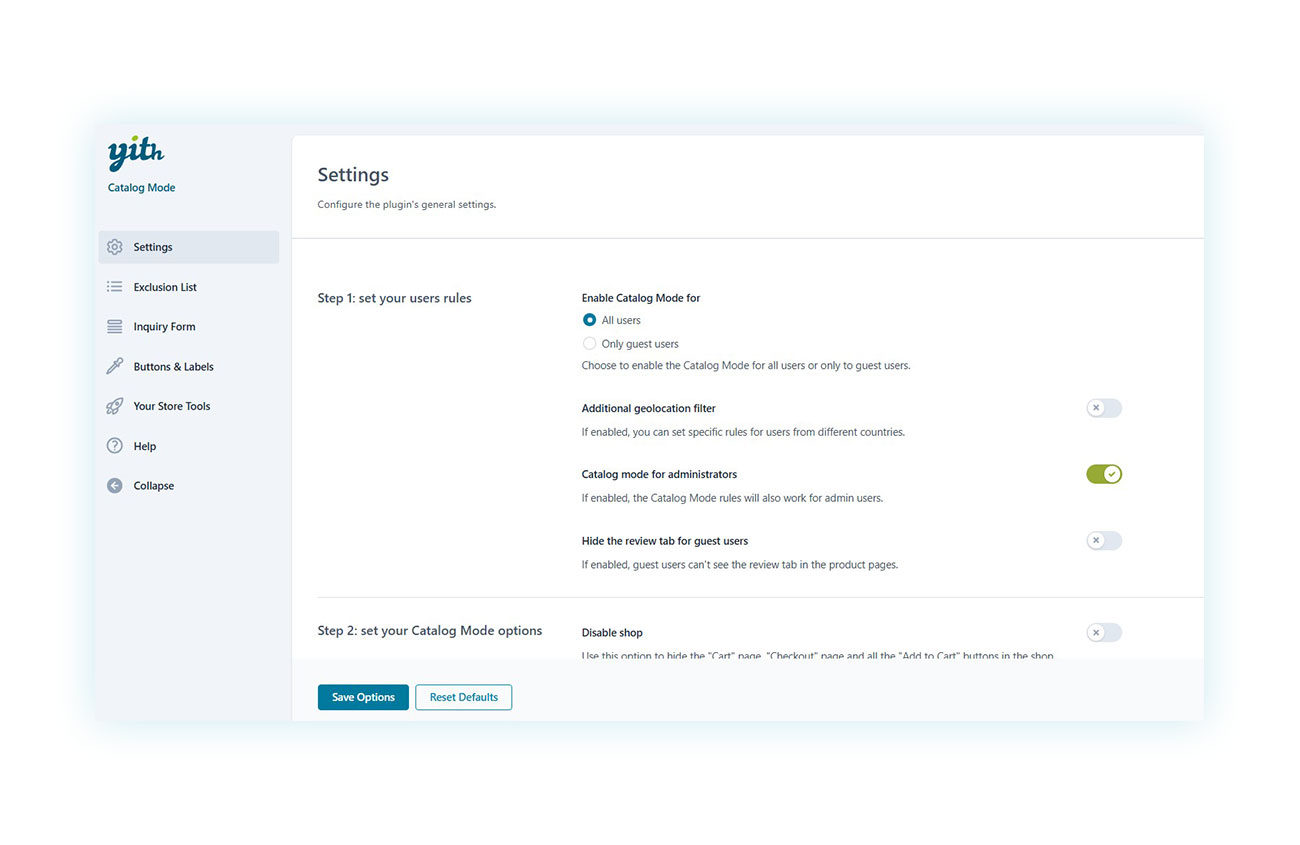
Here you can:
- Exclude certain products from the catalog, so that they behave like traditional products with the option to purchase.
- Show the catalog only to certain customers.
- Deactivate the Shop completely, hiding the purchase, cart, and checkout buttons.
- Customize the default form.
- Customize the visual appearance of the catalog.
And much more.
The YITH Advantage: From simple form to negotiation engine
The second plugin we recommend is YITH Request a Quote for WooCommerce. This plugin, also available in free and premium versions, allows you to automate the quote request system, making it more similar to the traditional purchasing process that everyone is familiar with.
In fact, rather than sending emails or making phone calls, which are unpopular nowadays, a button will appear on your products once they are installed and activated. This button will allow you to add them to the quote request:

Once all the products have been added to the quote request, the customer can proceed to fill it out:
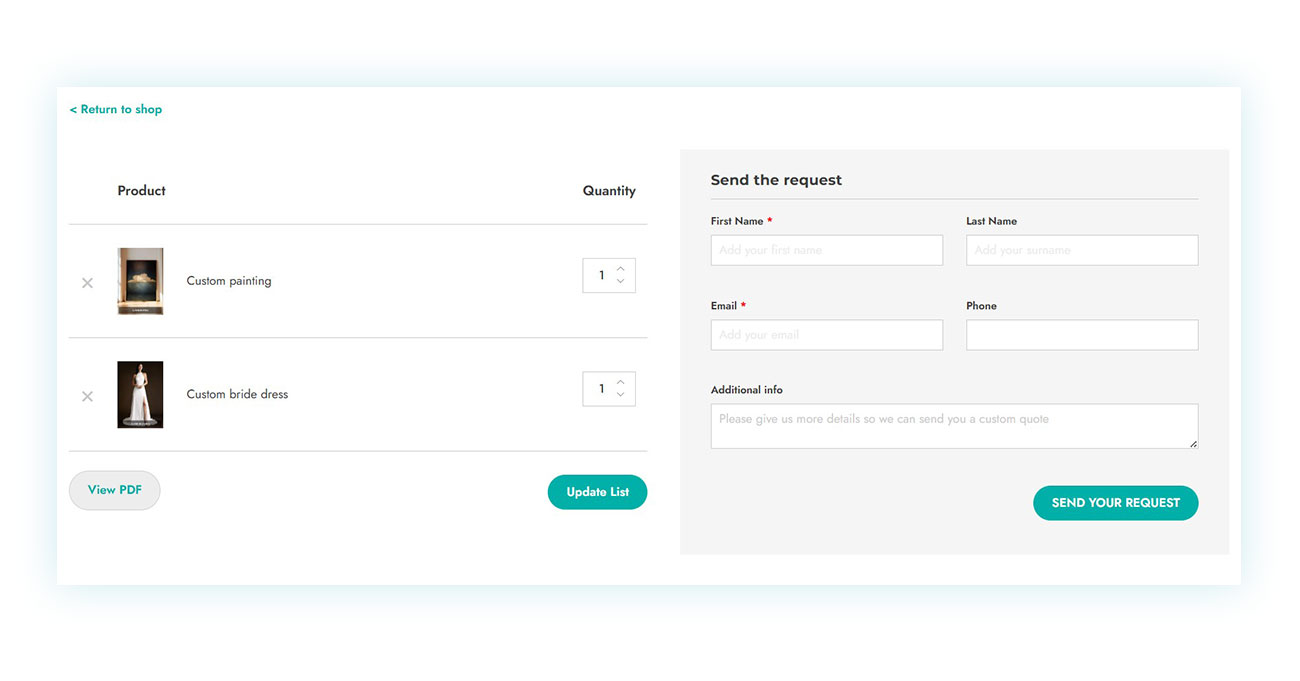
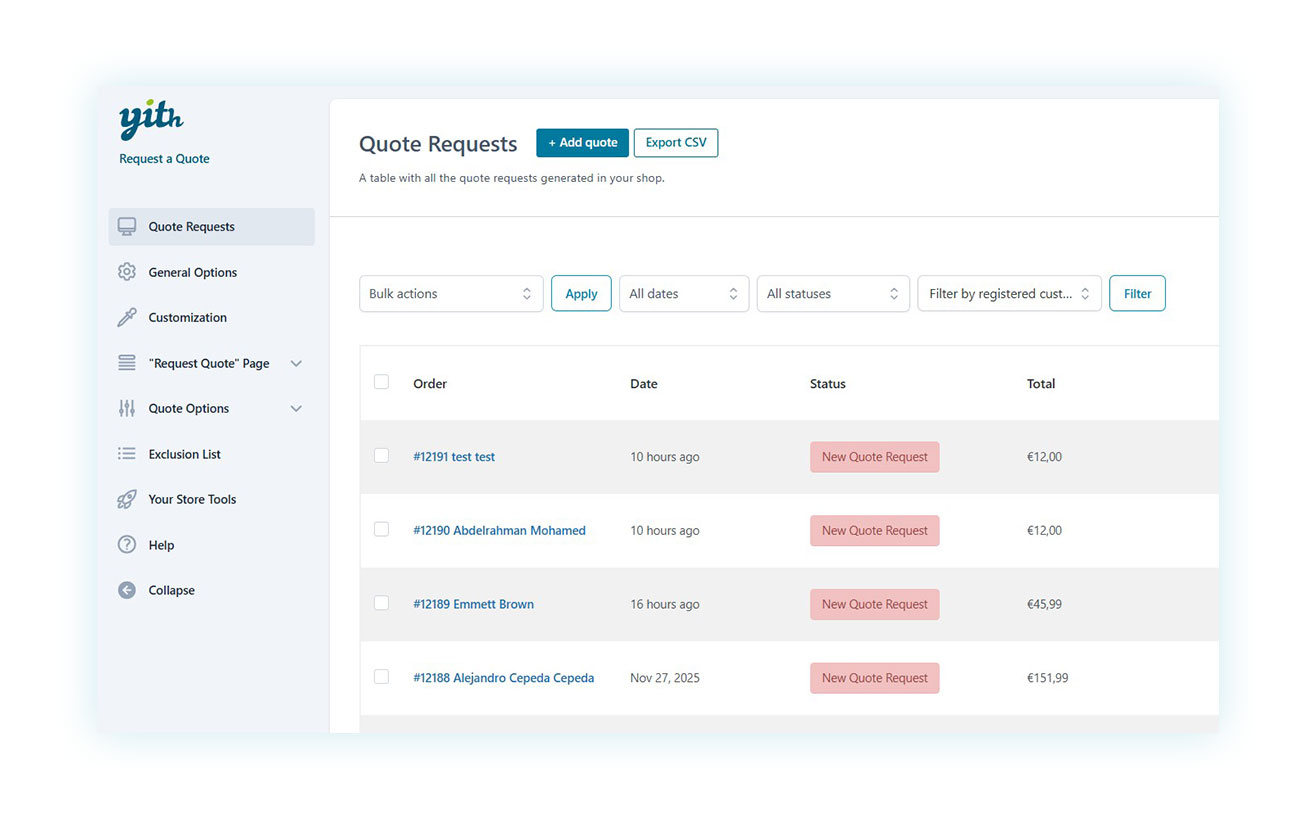
Once sent, it will appear in your control panel where you can view it, confirm prices, and send it back to the customer without having to send a single email:
As with Catalog Mode, you can customize this plugin’s behavior:
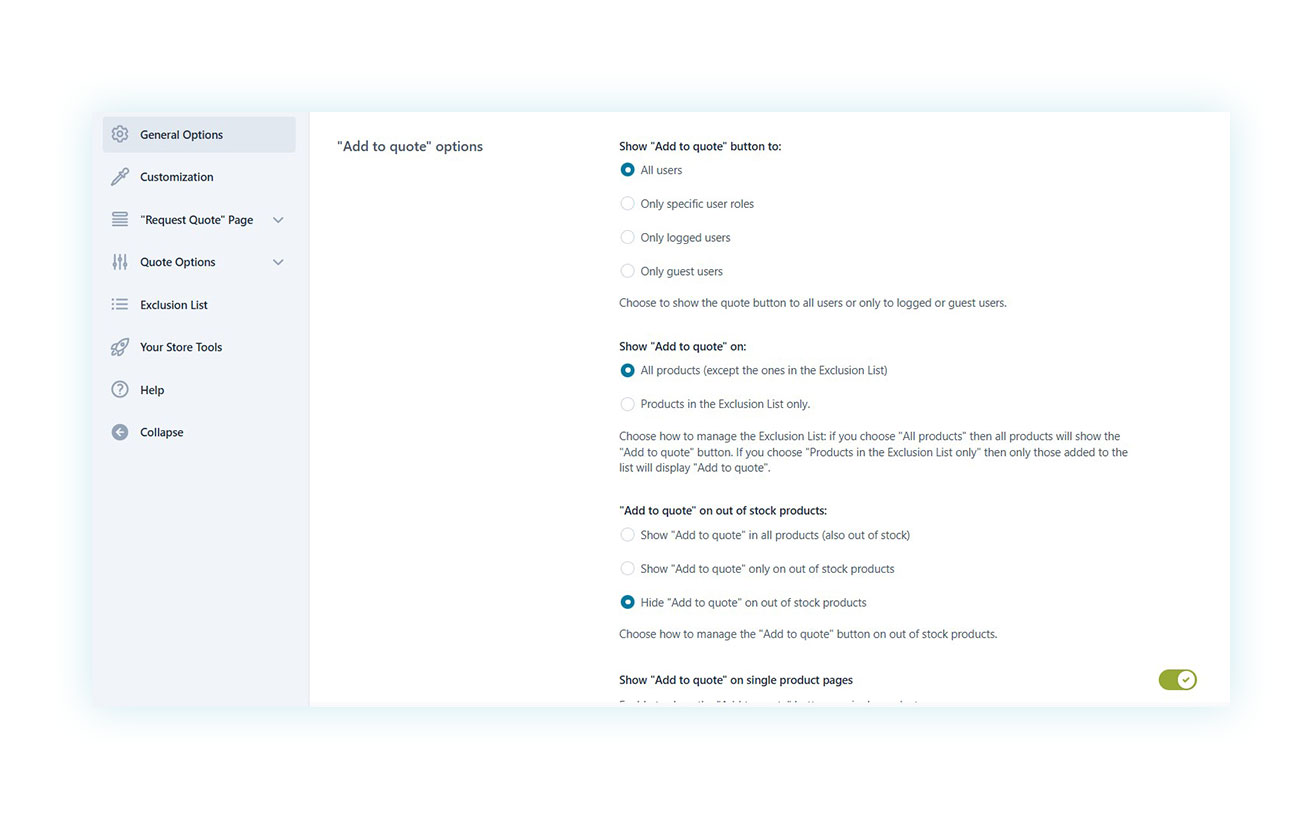
You can activate it for all products or just some, show the quote request to all users or just specific user roles, and much more.
When to use Catalog Mode and when to Request a Quote? The selection criteria
As we’ve seen, these two plugins serve different purposes, although they are often used together. We will discuss this in the next section. So, when and why should you use each plugin?
Create a Catalog if…
- …your goal is only to showcase products (such as a portfolio).
- …you don’t need a structured negotiation process.
- …you want to hide prices from the public but manage B2B customers separately (e.g., via phone/email).
- …you need to temporarily pause sales.
Offer Request a Quote if…
- …your business model is B2B and based on negotiation.
- …your prices depend on quantities or customizations.
- …you want to capture qualified leads and know exactly which products they are interested in.
- …you want to automate the process of sending quotes and creating orders.
The Hybrid Strategy: How to integrate Catalog Mode and Request a Quote for maximum results
As mentioned above, both plugins are often used together. Not surprisingly, they offer special integration with each other.
Using both tools simultaneously allows you to manage each product individually (instead of applying a general rule) and choose where to hide or show the price and add-to-cart button.
This way, you can show a professional showcase to general users and create an automated quote system for your B2B customers, creating an ideal synergy for a business targeting different customer categories.
Important note: If this is your goal, we also recommend the YITH WooCommerce Role Based Prices plugin, which can show different prices based on specific user roles.
FAQs about Catalog Mode and Request a Quote
Q. Can I use Request a Quote only for some products and sell others normally?
A. Yes, the premium version of the YITH Request a Quote for WooCommerce plugin allows you to activate the tool’s features only on certain products.
Q. Are YITH plugins compatible with each other?
A. Yes, all YITH plugins are based on the same framework. This ensures 100% compatibility and enables advanced features by developing integrations between different plugins. One example is the integration between Catalog Mode and Request a Quote, which is discussed in this article. However, Request a Quote offers integration with almost 20 different YITH plugins.
Q. Can I customize the contact and quote forms?
A. Yes, the contact and quote form can be customized to suit your needs.
Q. Is there a FREE version of these plugins?
A. Yes, both of the plugins discussed in this article have free and premium versions. This allows you to try out the plugins’ basic features before deciding whether to invest.
Conclusion: What is the right solution for your business?
By now, you have a clear understanding of how to transform a WooCommerce eCommerce site into a flexible, modern system suitable for complex business models. By 2026, having a traditional shop will no longer be enough: Customers will expect personalized, immediate purchasing paths consistent with the type of product or service you offer.
Additionally, the immediacy of social networks and phone apps has made the idea of sending an email far removed from most people’s daily lives.
But that doesn’t mean your quote-based store can’t continue to exist (and thrive, for that matter). This is where Catalog Mode and Request a Quote come into play as two strategic levers capable of reshaping your commercial communication.
- Catalog Mode is the ideal choice when the priority is to control what to show and to whom. It is perfect for those who want to offer a professional showcase, temporarily hide purchase buttons, limit price visibility, or have a portfolio that can be shared without starting a sales process. In all those cases where you need to “show without selling” (during maintenance, when dealing with out of stock products, or to select access to certain information) this mode becomes the most streamlined and intelligent tool to implement.
- Request a Quote, on the other hand, focuses on direct customer relations and negotiation. It is definitely designed for B2B businesses and products with variable costs, but that’s not all! Tailor-made services, machinery, and valuable craftsmanship can shine with this type of sale. Here, the focus is not on showing, but on guiding the customer towards a clear, transparent, and automated quote.
- And then there is the hybrid strategy, probably the most powerful one. The integration between YITH WooCommerce Catalog Mode and YITH Request a Quote for WooCommerce allows for granular and versatile management of the entire catalog.In summary:
- If your goal is “Show without selling” → choose Catalog Mode.
- If your goal is “Negotiate and sell” → choose Request a Quote.
- If your goal is “Both” → adopt the YITH hybrid strategy.
Discover YITH WooCommerce Catalog Mode and YITH WooCommerce Request a Quote and use all the tools at your disposal to make the right choice.